
Merchant Guides
Settlement
Track payouts and settlement of gift card sales revenue.
The Settlement view shows amounts GlobaPay will pay you for eligible sales or redemptions. This reflects your merchant payout status, not your customers' payment status on gift card orders, a sale or redemption can be completed for the customer while its settlement is still pending payout to you.
Summary
- Pending payout: total net amount not yet paid out.
- Paid this month: total net amount paid out so far in the current calendar month.
- Open items: count of settlement records still pending payout.
Settlement table
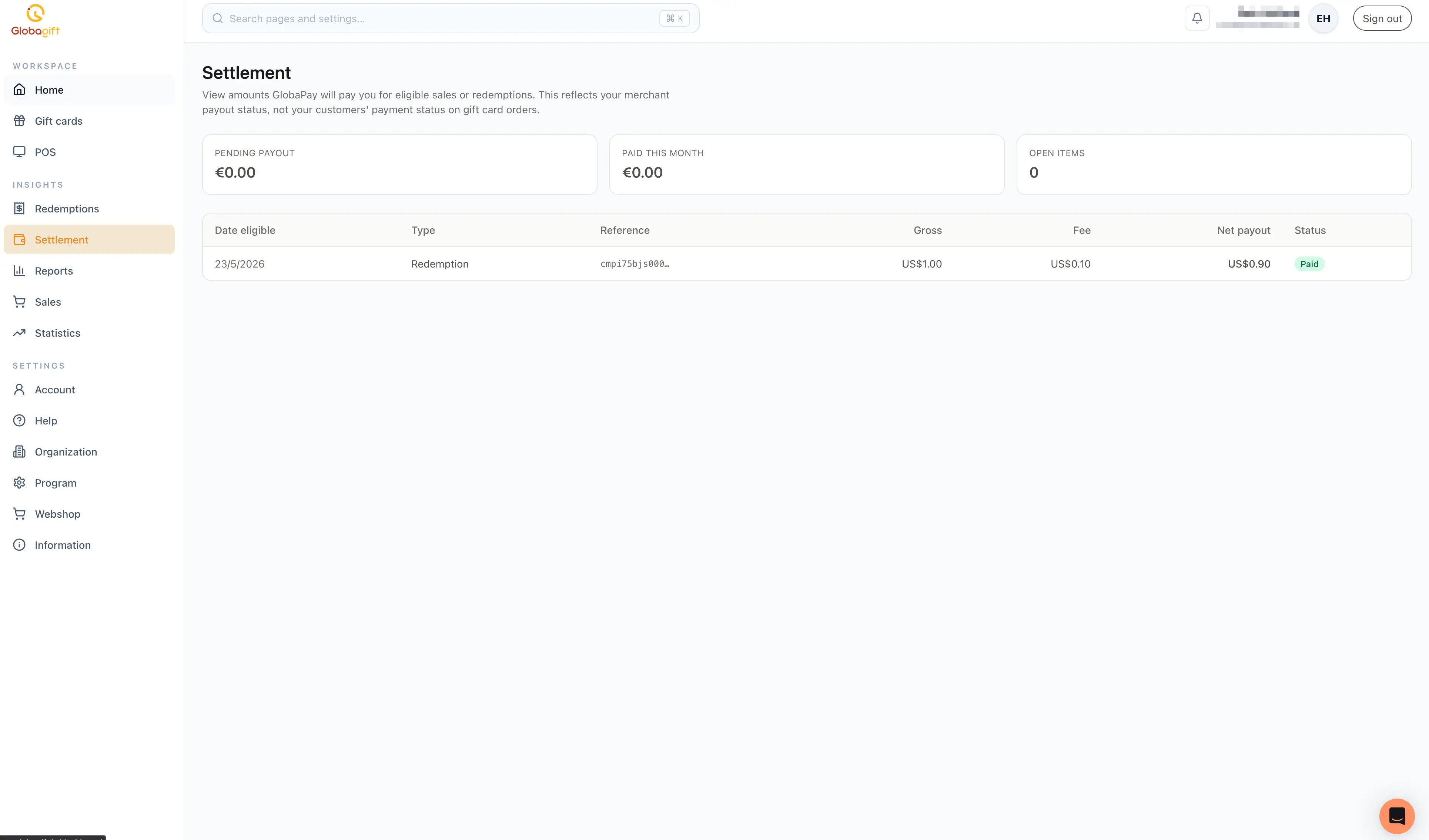
Each row is one settlement record, with:
- Date eligible: when the underlying sale or redemption became eligible for payout.
- Type:
Order(a sale) orRedemption. - Reference: the underlying order or redemption's ID.
- Gross: the gross amount before fees.
- Fee: GlobaPay's fee for this item.
- Net payout: gross minus fee, what you actually receive.
- Status:
Pending payout,In progress,Paid, orVoid.
Only one settlement type may apply to your account
Depending on how your account is configured, settlement may be based on sales (settlement on sale) or on redemptions (settlement on redemption), not both. If your account is set up for redemption-based settlement, you will not see order-sourced rows here, and vice versa.